
Read-only. Credentials never leave your account.
Your Well-Architected review, in minutes — not weeks.
Infrox reads your live AWS configuration, scores it across all six pillars, and hands back a prioritised report you can re-run whenever you like.
Free to sign up and connect an account. Payment starts when you run a scan.
Why this exists
Reviews shouldn't take weeks.
A Well-Architected review is normally workshops, screenshots and a consultant working a checklist across dozens of services. Infrox turns that engagement into something you can run yourself, today, and again next month.
The engagement model fills your calendar for the duration: workshops for each pillar, stakeholder interviews, screenshot reviews, access chasing and repeated deck walkthroughs, all before a first report exists.
- One click, read-only — no workshop to schedule
- Reads live configuration, so it is always current
- Whole fleets, scanned together and scheduled
- Every finding paired with a verified fix
- A trend line that shows the work landing
Complete coverage
One score. Six pillars behind it.
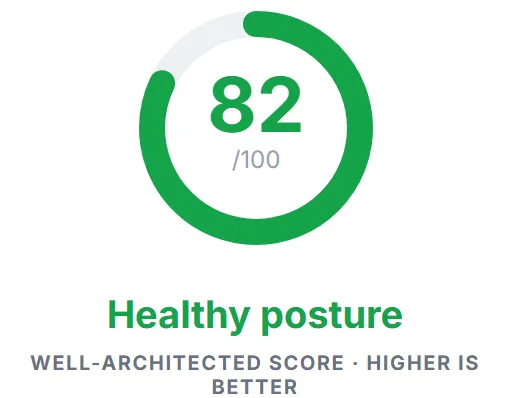
The headline number is never a black box. Every pillar is scored on its own and rolls up into the WAR score, so you always know which part moved it.
Sample scores from a demo account.
Remediation
Every finding comes with the fix.
Finding problems is the easy half. Each finding is paired with a fix that has been verified against the AWS documentation, for the exact resources that failed — so the gap between knowing and fixing closes in a couple of minutes.
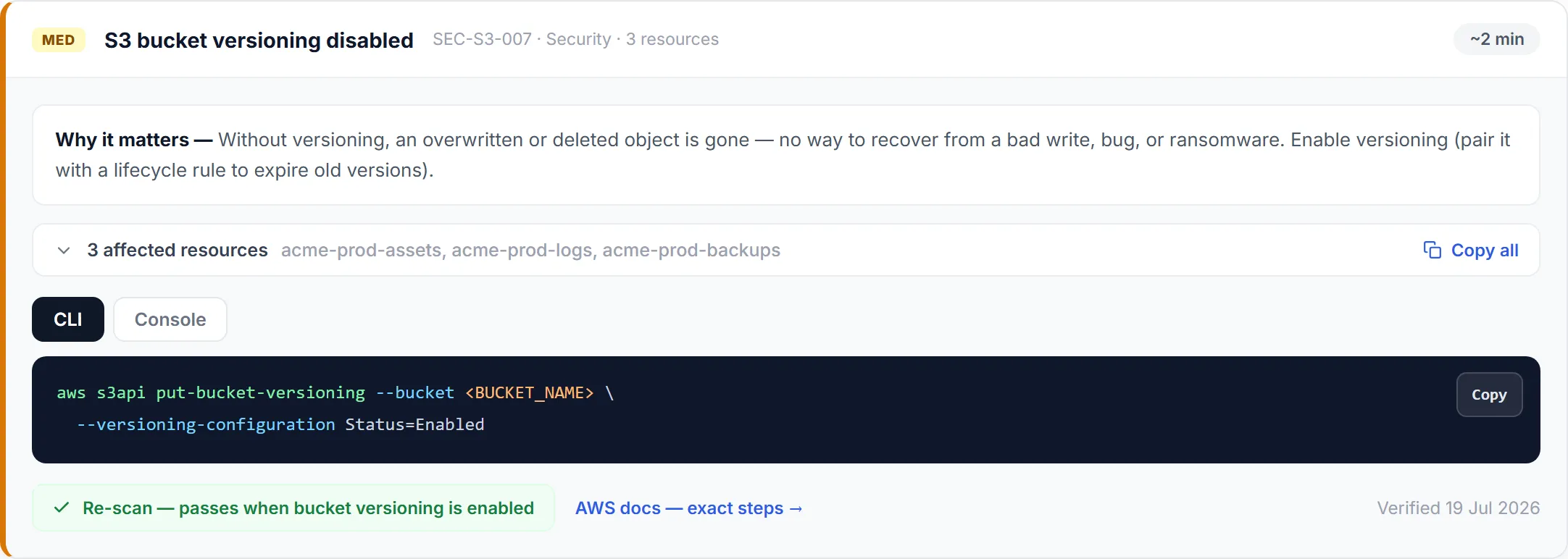
- Why it actually matters
- The exact failing resources
- Written by engineers, never generated
- The re-scan condition, stated up front
227 fixes — one for every check we run. Each carries a link to the authoritative AWS documentation and the date it was last verified against it, because console labels and command flags drift.
Proof of progress
The score moves with the work.
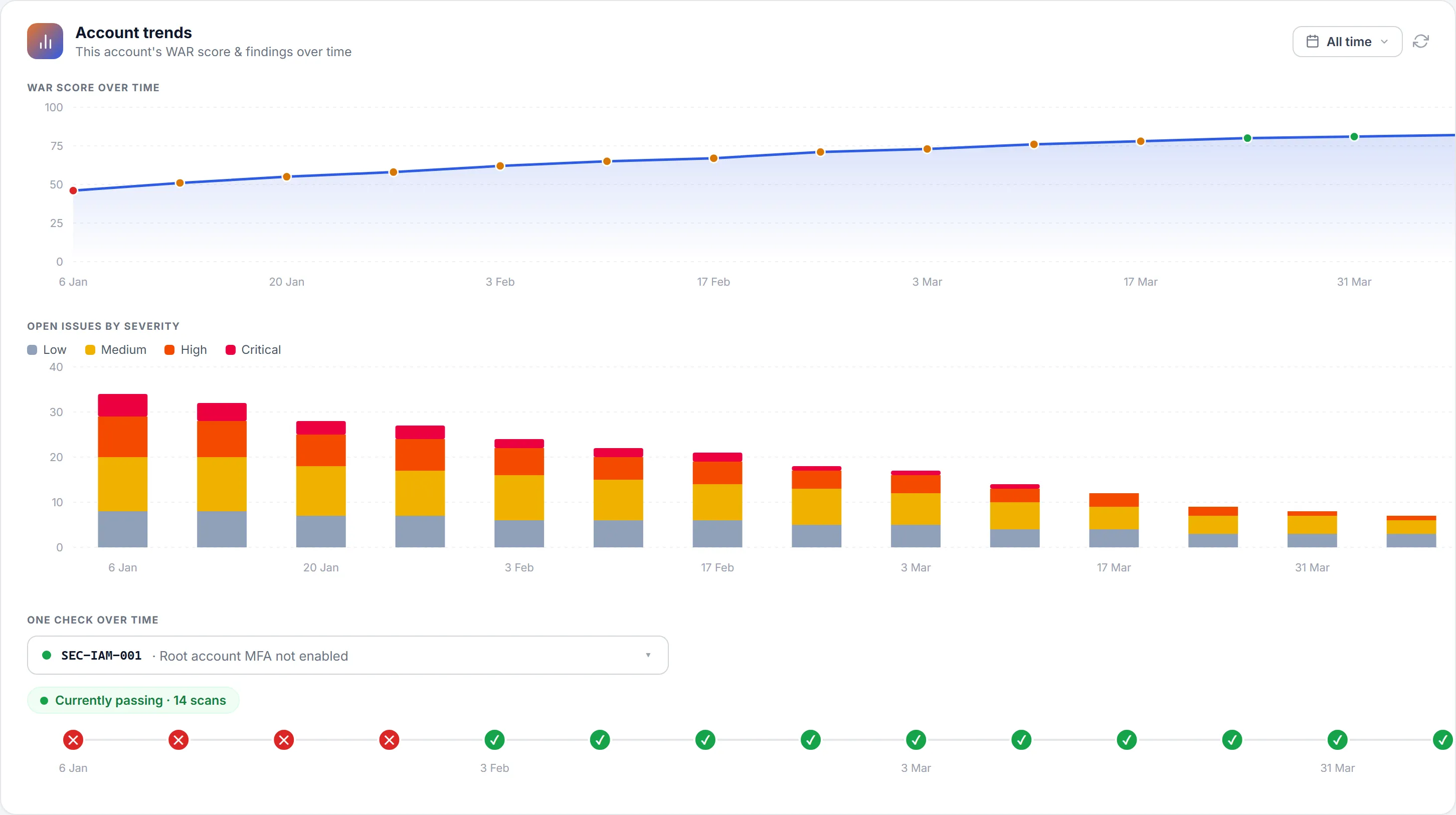
A report you read once is a document. A score you watch move is a programme. Every scan is diffed against the last, so the change is visible rather than asserted.
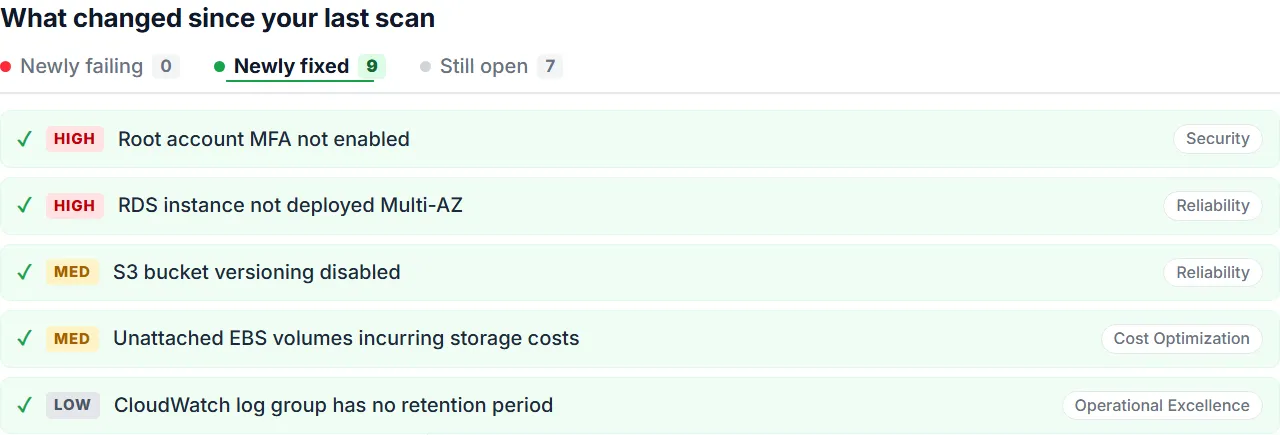
What changed
Every scan is diffed against the last — newly failing, newly fixed, still open.
Risk coming down
Open issues by severity on every run, so the trend is visible rather than asserted.
One check over time
Evidence a specific control stayed fixed — not just that it passes today.
For MSPs, consultants and platform teams
One run. Every account. Your logo on the report.
Group your clients' accounts however you like, scan them together on a schedule, and hand each one a report that looks like it came from you.
Scan the whole fleet at once
Tag accounts by client or environment, select the group, and run them together — then roll every result into one combined fleet report.
On a schedule
Set it once. Each run emails the report and a “what changed” digest.
Portfolio view
Every connected account’s posture on one screen, worst first.
Your brand on every report
Your logo, your colour, your company name on the PDF — so the client sees your firm, not ours. Built for consultants who hand the report straight over.
Security posture
Your credentials never leave your account.
Infrox is read-only by construction. Here is what that means for any account you connect.
No keys, ever
You deploy it with one click, and it grants read-only access. Infrox never asks for, stores, or accepts an access key.
You stay in control
The stack is yours. Delete it and access ends immediately — there is nothing on our side to ask us to remove.
Roles for your team
Owner, admin, member and viewer. An external client can be given a viewer seat without seeing your other accounts.
Two-step verification
Optional TOTP on your own account, via any authenticator app.
How it works
Connect once. Then scan, fix, prove — every month.
Connect an account
One click, read-only access. Nothing to create, nothing to store, revoke whenever you like.
Run the review
227+ checks across all six pillars, scored 0–100 and ranked worst-first.
We hand you the fix
Every finding carries a verified fix for the exact resources that failed.
Re-scan — the score moves
The check flips to passing, the diff shows it as newly fixed, and the trend line rises.
See it against your own account.
Connect an account read-only and see exactly what a review covers — before you pay for one.